# Track products in AI shopping answers
> Products shows how each AI platform answers about each of your products: whether it names them, the price it quotes and the sources it cites.
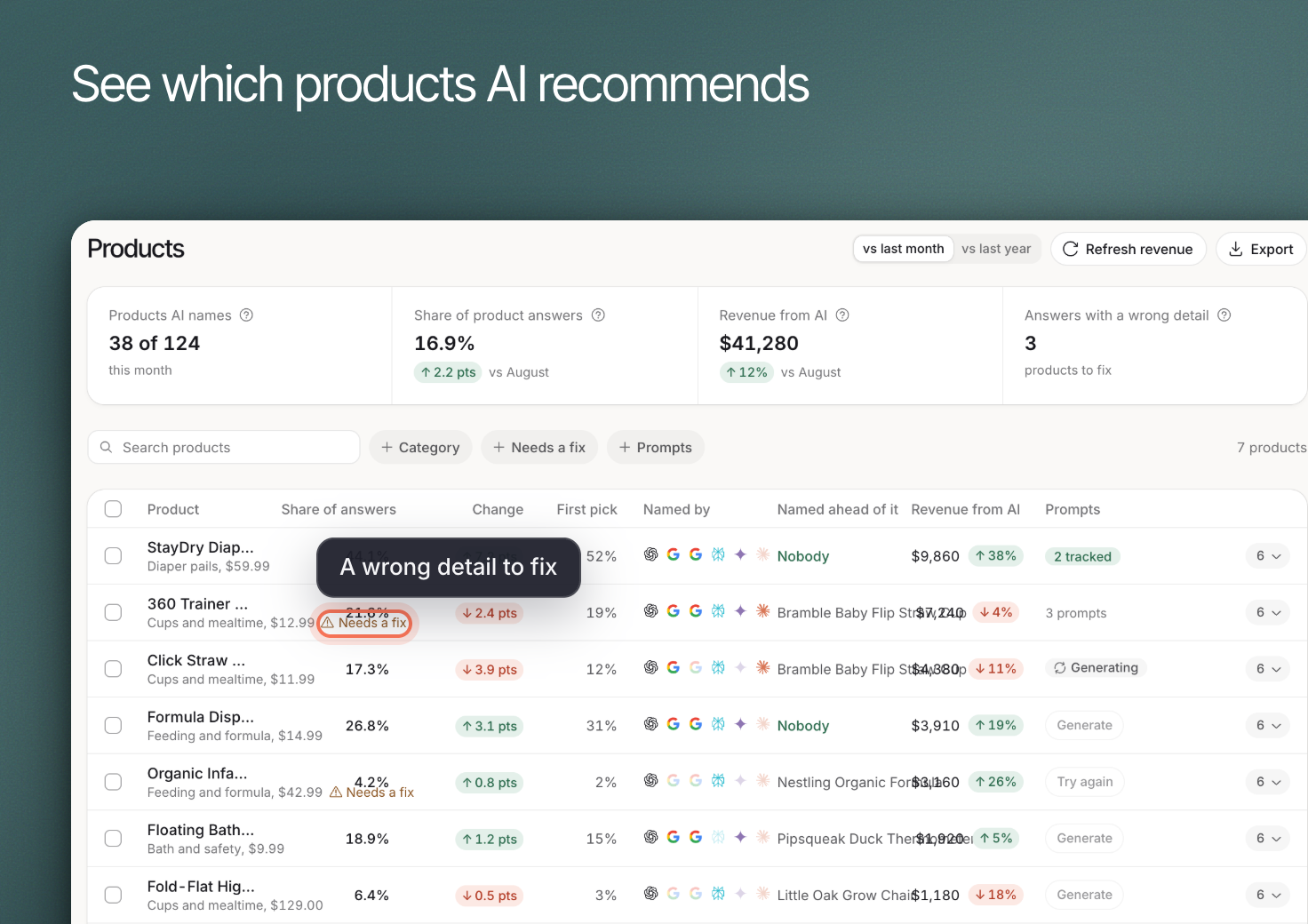 Use **Shopping > Products** to review product appearances in collected AI shopping answers and investigate incorrect details. Products reads your product list and revenue from Google Analytics 4 ecommerce events, so connect [Google Analytics](https://www.erlin.ai/docs/integrations/google-analytics) first.
## 1. Find the products to investigate
Use **Search products**, **Category** and **Prompts** to narrow the list. Review **Products AI names**, which counts products named at least once in an AI answer last month out of your catalog (for example "20 of 80"). It summarizes observed appearances, not proof that every potential buyer sees those products.
**Share of answers** is the percentage of the month's AI answers that name any product that also name this one. For example, if 40 answers name a product and 10 of them name this one, its share is 25%. **Share of product answers** at the top is the percentage of all product mentions in answers to your tracked prompts that are yours.
A product absent from the tracked answers may still appear in other conversations. Keep the prompt set and platform scope in mind.
## 2. Read how the product appears
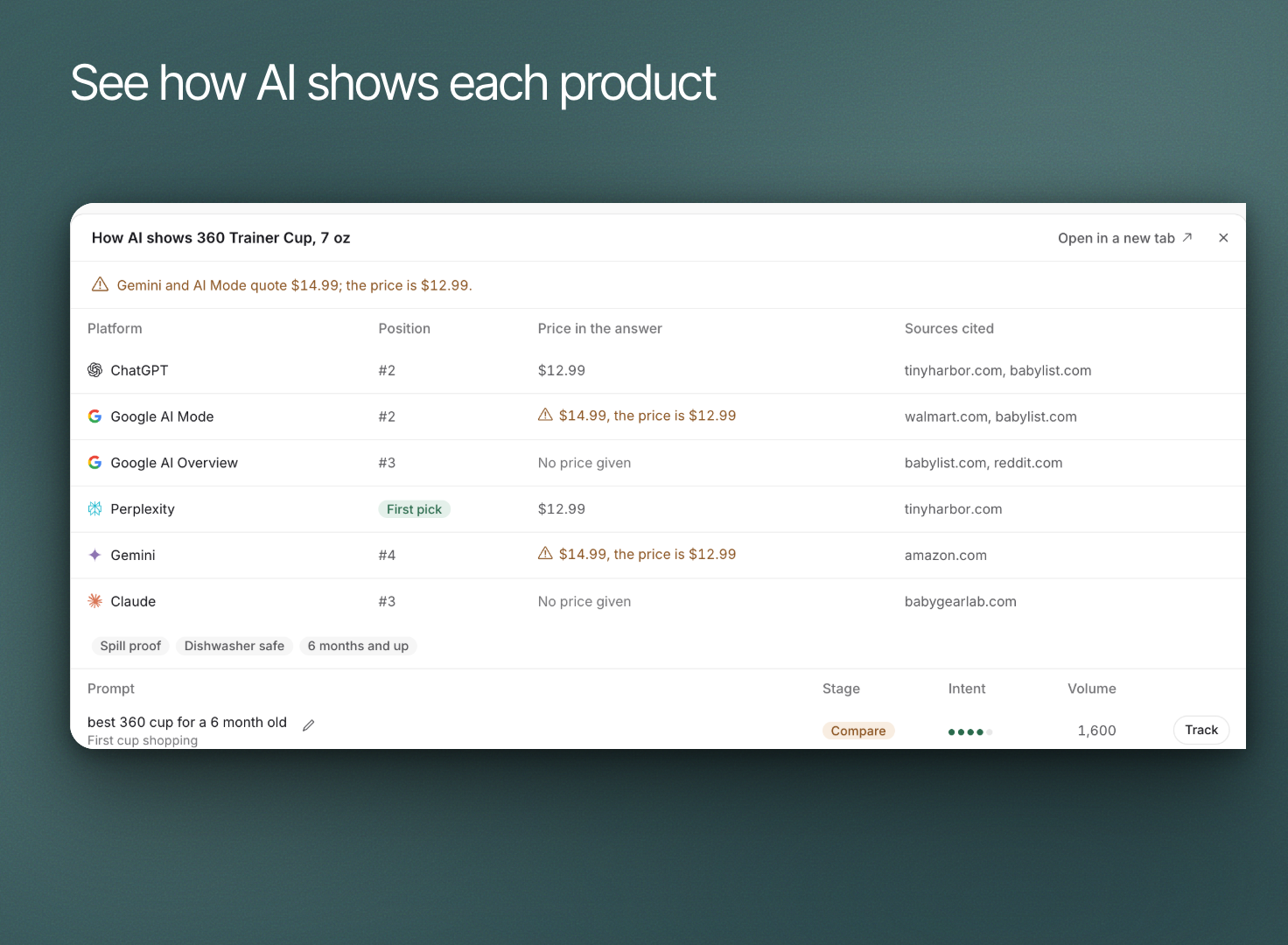
Expand a product to review **How AI shows** it. Check the named product, model or variant against the answer. Review the prompt's buying context before interpreting the recommendation.
Use **Needs a fix** to investigate answers that quote a price more than 10% off the product's average price (its revenue divided by units sold in Google Analytics). Check the current product page and the cited source before deciding which information is wrong.
Use **Shopping > Products** to review product appearances in collected AI shopping answers and investigate incorrect details. Products reads your product list and revenue from Google Analytics 4 ecommerce events, so connect [Google Analytics](https://www.erlin.ai/docs/integrations/google-analytics) first.
## 1. Find the products to investigate
Use **Search products**, **Category** and **Prompts** to narrow the list. Review **Products AI names**, which counts products named at least once in an AI answer last month out of your catalog (for example "20 of 80"). It summarizes observed appearances, not proof that every potential buyer sees those products.
**Share of answers** is the percentage of the month's AI answers that name any product that also name this one. For example, if 40 answers name a product and 10 of them name this one, its share is 25%. **Share of product answers** at the top is the percentage of all product mentions in answers to your tracked prompts that are yours.
A product absent from the tracked answers may still appear in other conversations. Keep the prompt set and platform scope in mind.
## 2. Read how the product appears
Expand a product to review **How AI shows** it. Check the named product, model or variant against the answer. Review the prompt's buying context before interpreting the recommendation.
Use **Needs a fix** to investigate answers that quote a price more than 10% off the product's average price (its revenue divided by units sold in Google Analytics). Check the current product page and the cited source before deciding which information is wrong.
 ## 3. Choose relevant product prompts
Review prompts that describe how a buyer would choose the product: intended use, constraints and alternatives. Track useful questions rather than adding every possible wording.
A product with no prompts shows a **Generate** button. Generating prompts is for paid plans, runs one job at a time and handles up to 10 products at once (select rows, then **Generate prompts**). In credits mode it costs 2 credits for each product that gets prompts. Open the product to edit a prompt before it is tracked, then ask for **More prompts** (500 a month per brand) and **Track all** to send them to AI Visibility.
Prompt Discovery demand is estimated. It is not a count of purchases or proof that a specific shopping conversation occurred. See [Prompt Discovery](https://www.erlin.ai/docs/ai-visibility/prompts/discovery).
## 4. Connect appearance to outcomes carefully
Use [Sales](https://www.erlin.ai/docs/shopping/sales) for available analytics outcomes. A product mention, a website visit and a purchase are separate events.
Correct inaccurate owned content where appropriate and record the change. Do not assume updating your page submits a feed to an AI platform or guarantees a new product appearance. Review later answers to see what changed.
## 3. Choose relevant product prompts
Review prompts that describe how a buyer would choose the product: intended use, constraints and alternatives. Track useful questions rather than adding every possible wording.
A product with no prompts shows a **Generate** button. Generating prompts is for paid plans, runs one job at a time and handles up to 10 products at once (select rows, then **Generate prompts**). In credits mode it costs 2 credits for each product that gets prompts. Open the product to edit a prompt before it is tracked, then ask for **More prompts** (500 a month per brand) and **Track all** to send them to AI Visibility.
Prompt Discovery demand is estimated. It is not a count of purchases or proof that a specific shopping conversation occurred. See [Prompt Discovery](https://www.erlin.ai/docs/ai-visibility/prompts/discovery).
## 4. Connect appearance to outcomes carefully
Use [Sales](https://www.erlin.ai/docs/shopping/sales) for available analytics outcomes. A product mention, a website visit and a purchase are separate events.
Correct inaccurate owned content where appropriate and record the change. Do not assume updating your page submits a feed to an AI platform or guarantees a new product appearance. Review later answers to see what changed.