# Turn recommendations into actions
> Read the evidence behind each recommendation, choose a specific change, complete the work and run a comparable check afterwards.
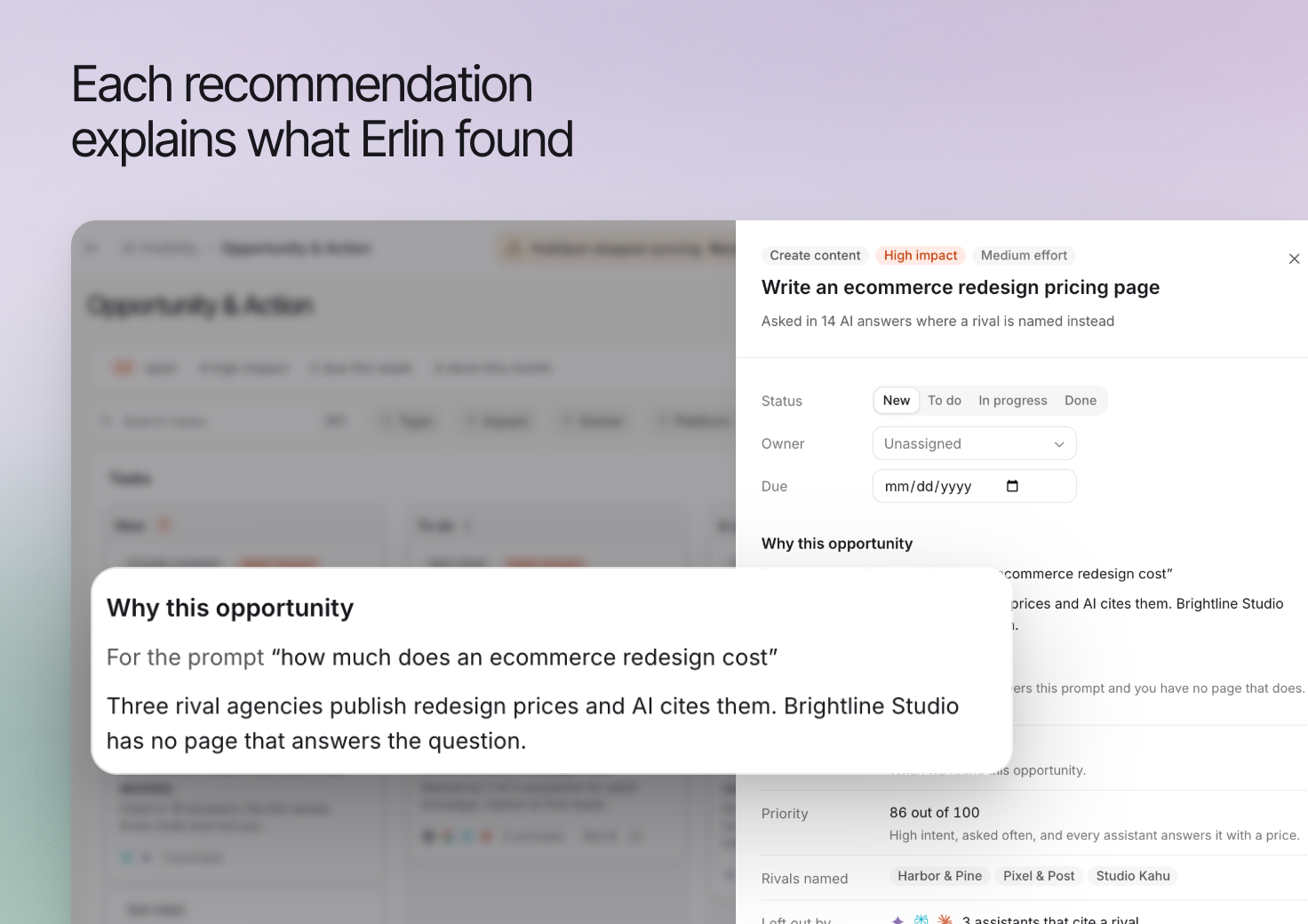 A recommendation connects a finding in the collected answers with work you can investigate, such as improving a page or addressing a missing explanation.
Use this guide to review the evidence, choose a useful task and check the result after making a change.
## Before you start
Erlin needs three things before it can suggest tasks:
- **Tracked prompts** that matter to your business. See [Prompt tracking](https://www.erlin.ai/docs/ai-visibility/prompts/tracking).
- **Selected competitors.** Without them, the page says "Add your competitors first". See [Competitors](https://www.erlin.ai/docs/ai-visibility/competitors).
- **Enough runs.** Each prompt needs at least 4 runs on different days in the last 90 days. Until then, **Find new tasks** is off and its hint reads, for example, "Run your prompts at least 4 times first (3 of 12 ready)."
Erlin also finds tasks automatically after a scheduled run and after you run a single prompt. Running all your prompts by hand does not start a search. **Find new tasks** costs no credits.
## 1. Open the recommendations
Open **AI Visibility > Opportunity & Action** and review the available tasks, or click **Find new tasks**.
Choose a finding related to a real customer decision. A recommendation about an unrelated product or service is not useful simply because it has a high priority label.
## 2. Read the evidence
Open the task and inspect the prompt, answer context and relevant source pages. Check what the evidence actually establishes.
For example, an answer may cite a competitor's page that explains a service in detail. That supports investigating the content gap. It does not establish that copying the page will cause your business to appear.
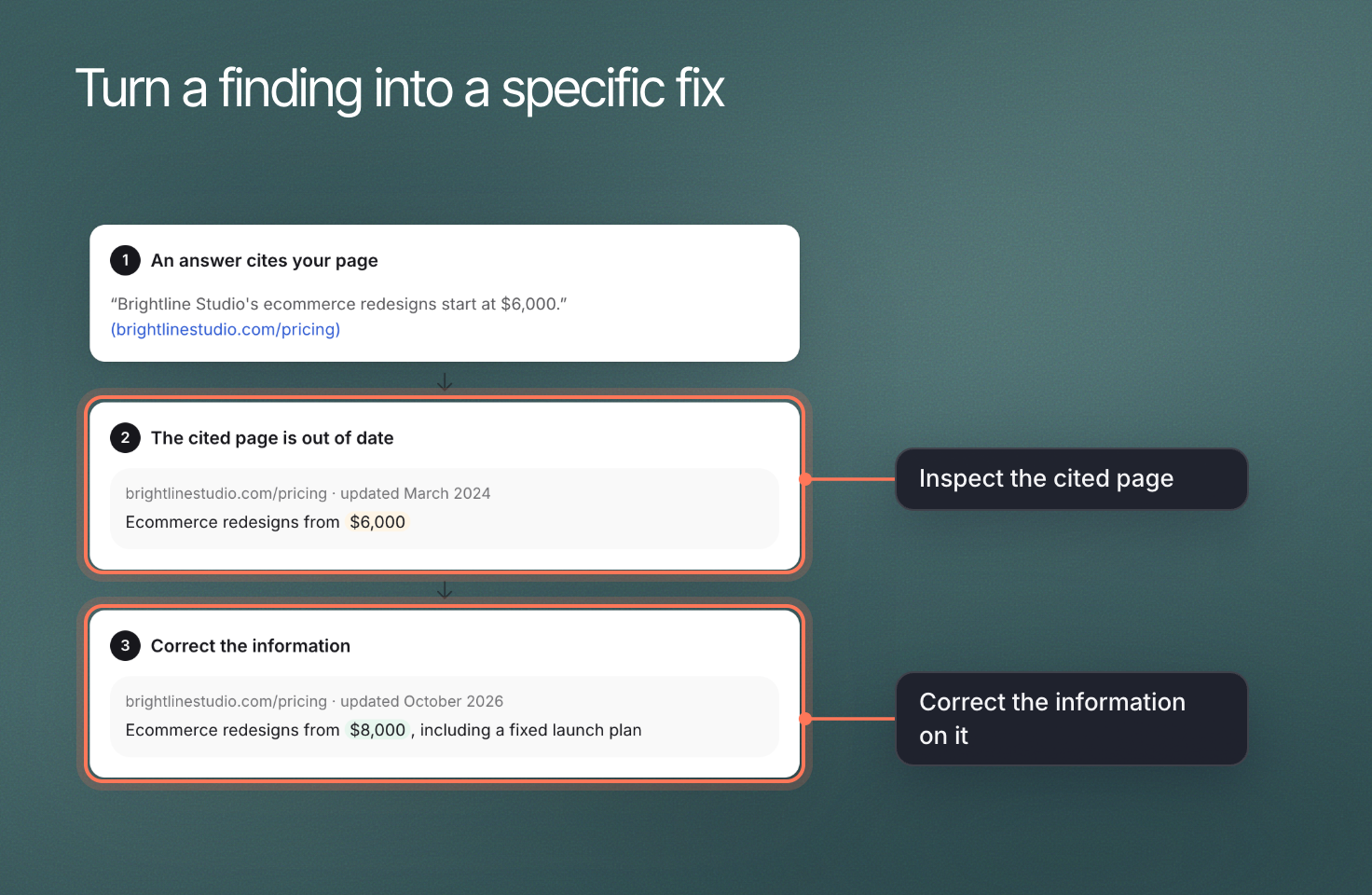
If the recommendation concerns an existing page, read that page before starting a rewrite. The information may already be present but unclear, outdated or difficult to find.
## 3. Choose a specific change
Turn the recommendation into a task with a clear result.
| Finding in an illustrative example | A focused task |
|---|---|
| An answer describes an outdated service | Verify the current service and correct the relevant published description |
| A recurring buying question is unanswered on your site | Add a useful explanation to the page that already serves that question |
| An answer relies on a third-party profile | Check the profile's accuracy and use its legitimate correction process where needed |
Avoid adding a new page for every finding. Improve the existing page when it already owns the reader's question.
A recommendation connects a finding in the collected answers with work you can investigate, such as improving a page or addressing a missing explanation.
Use this guide to review the evidence, choose a useful task and check the result after making a change.
## Before you start
Erlin needs three things before it can suggest tasks:
- **Tracked prompts** that matter to your business. See [Prompt tracking](https://www.erlin.ai/docs/ai-visibility/prompts/tracking).
- **Selected competitors.** Without them, the page says "Add your competitors first". See [Competitors](https://www.erlin.ai/docs/ai-visibility/competitors).
- **Enough runs.** Each prompt needs at least 4 runs on different days in the last 90 days. Until then, **Find new tasks** is off and its hint reads, for example, "Run your prompts at least 4 times first (3 of 12 ready)."
Erlin also finds tasks automatically after a scheduled run and after you run a single prompt. Running all your prompts by hand does not start a search. **Find new tasks** costs no credits.
## 1. Open the recommendations
Open **AI Visibility > Opportunity & Action** and review the available tasks, or click **Find new tasks**.
Choose a finding related to a real customer decision. A recommendation about an unrelated product or service is not useful simply because it has a high priority label.
## 2. Read the evidence
Open the task and inspect the prompt, answer context and relevant source pages. Check what the evidence actually establishes.
For example, an answer may cite a competitor's page that explains a service in detail. That supports investigating the content gap. It does not establish that copying the page will cause your business to appear.
If the recommendation concerns an existing page, read that page before starting a rewrite. The information may already be present but unclear, outdated or difficult to find.
## 3. Choose a specific change
Turn the recommendation into a task with a clear result.
| Finding in an illustrative example | A focused task |
|---|---|
| An answer describes an outdated service | Verify the current service and correct the relevant published description |
| A recurring buying question is unanswered on your site | Add a useful explanation to the page that already serves that question |
| An answer relies on a third-party profile | Check the profile's accuracy and use its legitimate correction process where needed |
Avoid adding a new page for every finding. Improve the existing page when it already owns the reader's question.
 ## 4. Plan and complete the work
Use the task's available status, owner and due-date controls to make the next action clear to your team.
Where Erlin offers a content action, review the generated brief or draft before publishing it. Completing a recommendation and publishing content are separate decisions.
Check factual claims, business details and links in the finished work. If you decide the recommendation is not relevant, record that decision through the available task controls.
## 5. Run a comparable check
After the change is live, rerun the relevant prompts or review their next scheduled run.
Compare the same prompt wording, platform and run location. Record any change in those settings alongside the result.
An answer that changes after an edit does not, by itself, prove the edit caused the change. Read the new answer and inspect its sources before deciding whether the task helped.
## If there are no recommendations
Check that each prompt has run at least 4 times on different days in the last 90 days, that you have picked competitors, and that you are looking at the intended brand and period. Review any missing-setup message in the app, including competitor setup where requested.
A completed run does not guarantee a useful recommendation for every prompt. Start by reading the answers directly, then investigate the gaps that matter to your business.
See [Prompt details](https://www.erlin.ai/docs/ai-visibility/prompts/prompt-details) and [Prompt tracking](https://www.erlin.ai/docs/ai-visibility/prompts/tracking) for the underlying evidence and run controls.
## 4. Plan and complete the work
Use the task's available status, owner and due-date controls to make the next action clear to your team.
Where Erlin offers a content action, review the generated brief or draft before publishing it. Completing a recommendation and publishing content are separate decisions.
Check factual claims, business details and links in the finished work. If you decide the recommendation is not relevant, record that decision through the available task controls.
## 5. Run a comparable check
After the change is live, rerun the relevant prompts or review their next scheduled run.
Compare the same prompt wording, platform and run location. Record any change in those settings alongside the result.
An answer that changes after an edit does not, by itself, prove the edit caused the change. Read the new answer and inspect its sources before deciding whether the task helped.
## If there are no recommendations
Check that each prompt has run at least 4 times on different days in the last 90 days, that you have picked competitors, and that you are looking at the intended brand and period. Review any missing-setup message in the app, including competitor setup where requested.
A completed run does not guarantee a useful recommendation for every prompt. Start by reading the answers directly, then investigate the gaps that matter to your business.
See [Prompt details](https://www.erlin.ai/docs/ai-visibility/prompts/prompt-details) and [Prompt tracking](https://www.erlin.ai/docs/ai-visibility/prompts/tracking) for the underlying evidence and run controls.