# Manage leads and their next steps
> Find the leads that need you, read the conversation, take over when a person should reply and keep each lead's next step clear.
 Use **CRM** to understand an inquiry, review its qualification and decide what needs attention. Erlin's CRM keeps the lead record alongside the conversation so your team can respond with context.
Every chat with the Erlin chat widget and every form a visitor sends becomes a lead here. Open the CRM from **Leads & Pipeline > CRM**.
## 1. Find the leads that need attention
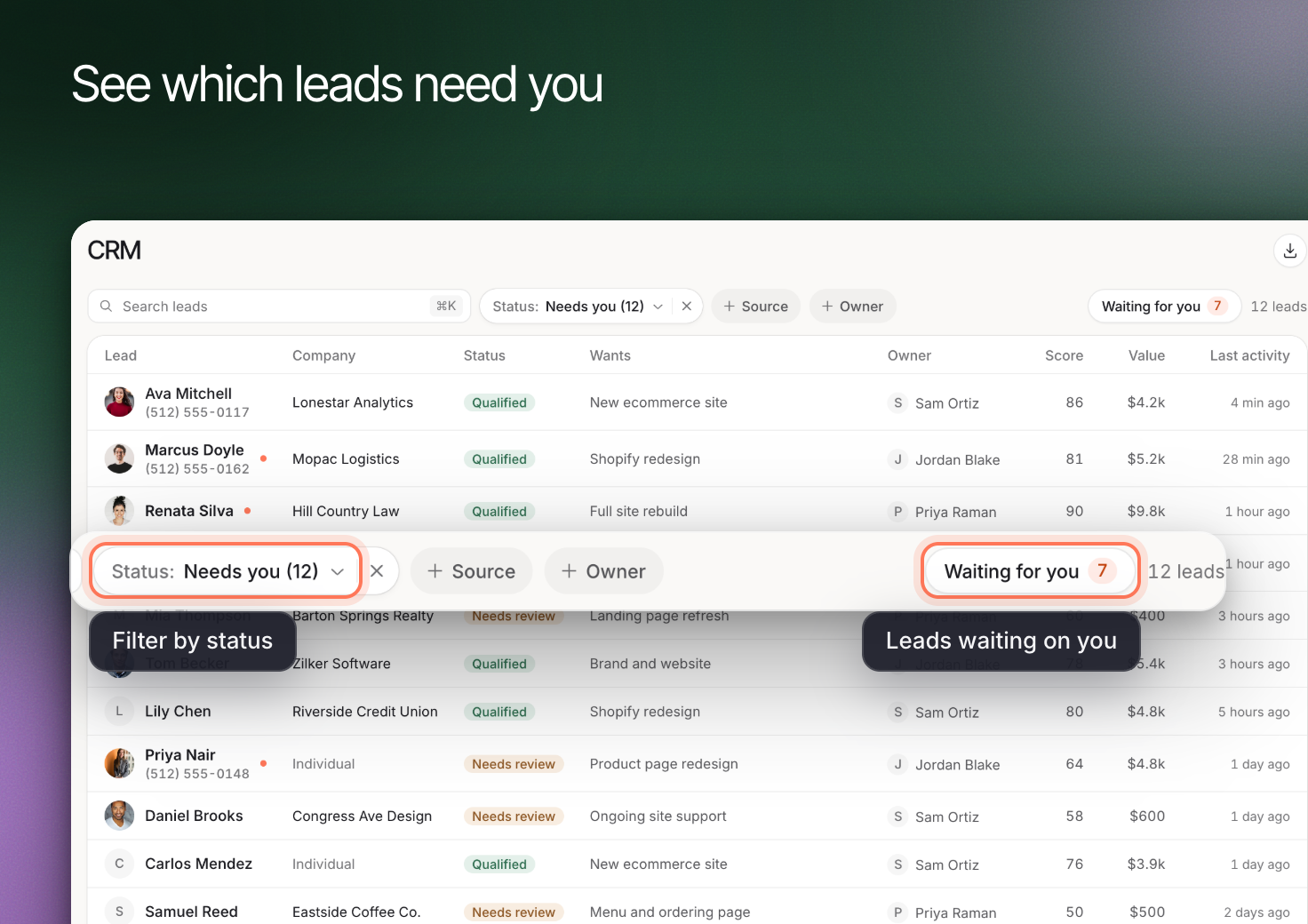
Open **CRM**. Use **Status**, **Source** and **Owner** to narrow the list. Review **Waiting for you** when you need to find work requiring a person's attention.
- **Status** shows one group at a time: **Needs you**, **Qualified**, **Not a fit** or **Spam**, each with a count. The CRM opens on **Needs you**. Clear the chip to see every lead.
- **Source** filters by where the lead came from: **Website chat**, **Contact form**, **Email**, or the AI assistant that sent the visitor. Pick more than one to see leads from any of them.
- **Owner** filters by **Mine**, **Unassigned** or a teammate.
The list includes **Wants**, **Score** and **Value** alongside the lead's identity and status. Treat these as starting points. A score does not replace the underlying answers, and an opportunity value is not the same as won revenue.
Erlin's score runs from 0 to 100 and reads **High** at 70 or more, **Medium** from 40 to 69 and **Low** below 40, or **Not scored yet**. In the list the score is green, amber or red from high to low. See [Lead Qualification](https://www.erlin.ai/docs/leads/lead-qualification) for how it is calculated.
## 2. Read the inquiry before responding
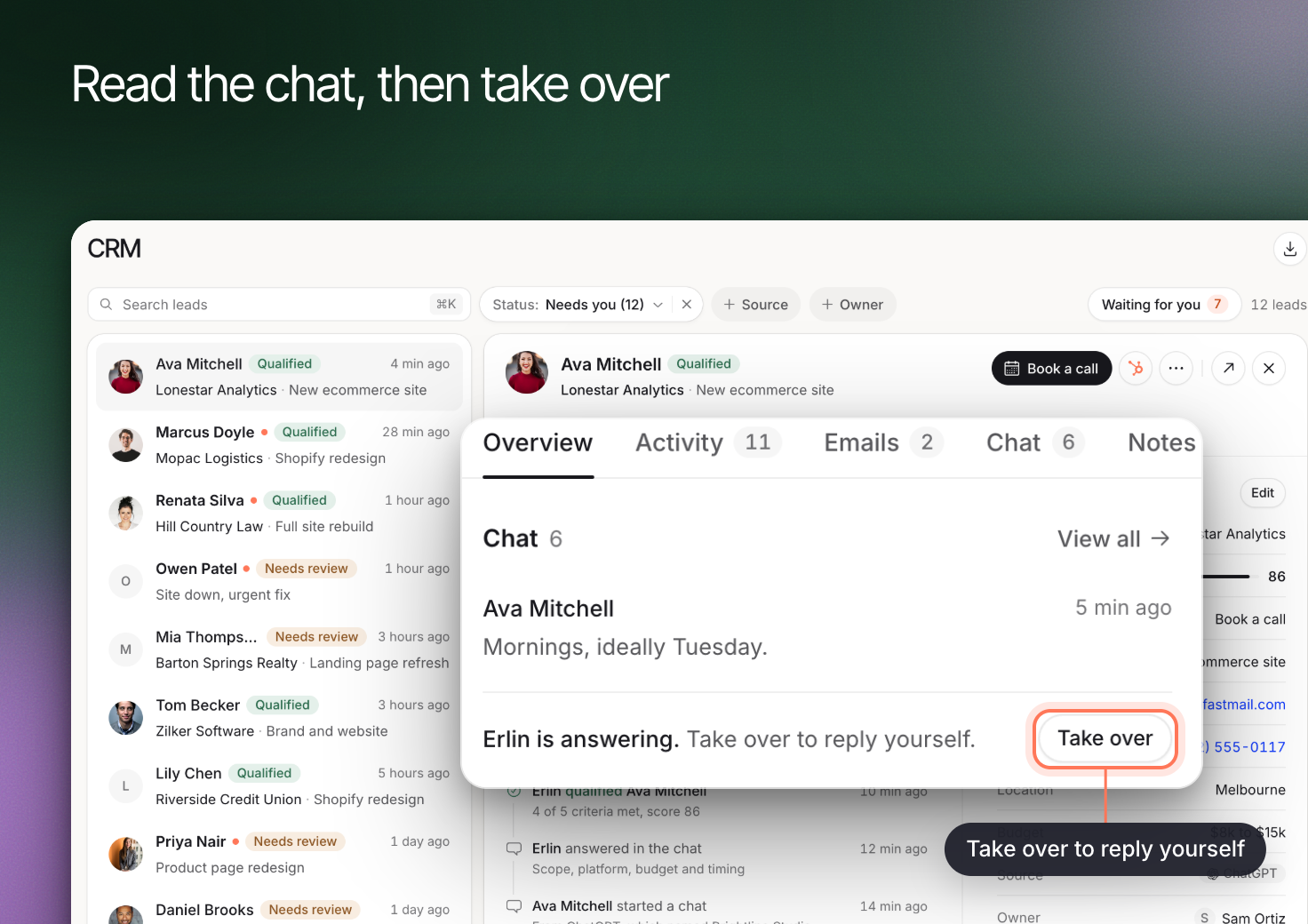
Open a lead and review **Overview**. Use **Chat**, **Emails** and **Activity** to understand what the visitor has already said and what has happened since the first inquiry.
The **Details** card shows **Why this status**, the reason behind the lead's grade, and the **Qualification** card shows the lead's checklist as "X of Y met", the number of Must have lead fit rules met. See [Lead fit rules](https://www.erlin.ai/docs/leads/lead-fit-rules).
Check the request against your services and qualification criteria. If an answer is missing, distinguish “not provided” from “does not meet the requirement.” Erlin can ask follow-up questions and flag cases for human review when needed.
Visitor documents shared through chat or email can also inform qualification. Read the relevant evidence before making a decision that depends on a document.
## 3. Take over when a person should respond
Choose **Take over** when you want to answer yourself. Erlin pauses its responses when a human takes over, so the visitor does not receive competing replies.
Review the conversation first. If Erlin has already asked about budget, respond to the answer rather than starting the same questions again. Add useful internal context in **Notes** for the next person handling the lead.
Use **CRM** to understand an inquiry, review its qualification and decide what needs attention. Erlin's CRM keeps the lead record alongside the conversation so your team can respond with context.
Every chat with the Erlin chat widget and every form a visitor sends becomes a lead here. Open the CRM from **Leads & Pipeline > CRM**.
## 1. Find the leads that need attention
Open **CRM**. Use **Status**, **Source** and **Owner** to narrow the list. Review **Waiting for you** when you need to find work requiring a person's attention.
- **Status** shows one group at a time: **Needs you**, **Qualified**, **Not a fit** or **Spam**, each with a count. The CRM opens on **Needs you**. Clear the chip to see every lead.
- **Source** filters by where the lead came from: **Website chat**, **Contact form**, **Email**, or the AI assistant that sent the visitor. Pick more than one to see leads from any of them.
- **Owner** filters by **Mine**, **Unassigned** or a teammate.
The list includes **Wants**, **Score** and **Value** alongside the lead's identity and status. Treat these as starting points. A score does not replace the underlying answers, and an opportunity value is not the same as won revenue.
Erlin's score runs from 0 to 100 and reads **High** at 70 or more, **Medium** from 40 to 69 and **Low** below 40, or **Not scored yet**. In the list the score is green, amber or red from high to low. See [Lead Qualification](https://www.erlin.ai/docs/leads/lead-qualification) for how it is calculated.
## 2. Read the inquiry before responding
Open a lead and review **Overview**. Use **Chat**, **Emails** and **Activity** to understand what the visitor has already said and what has happened since the first inquiry.
The **Details** card shows **Why this status**, the reason behind the lead's grade, and the **Qualification** card shows the lead's checklist as "X of Y met", the number of Must have lead fit rules met. See [Lead fit rules](https://www.erlin.ai/docs/leads/lead-fit-rules).
Check the request against your services and qualification criteria. If an answer is missing, distinguish “not provided” from “does not meet the requirement.” Erlin can ask follow-up questions and flag cases for human review when needed.
Visitor documents shared through chat or email can also inform qualification. Read the relevant evidence before making a decision that depends on a document.
## 3. Take over when a person should respond
Choose **Take over** when you want to answer yourself. Erlin pauses its responses when a human takes over, so the visitor does not receive competing replies.
Review the conversation first. If Erlin has already asked about budget, respond to the answer rather than starting the same questions again. Add useful internal context in **Notes** for the next person handling the lead.
 ## 4. Keep the next step clear
Check the lead's status, owner and meeting information against the latest conversation. A booked consultation, an open question and a won deal represent different stages.
When **Hand leads out to the team** is on in the **Team** tab of Lead Qualification, each new lead gets an owner. A lead from a contact your team has had before goes to the person who last had that contact. Otherwise the teammate with the fewest open leads gets it. Erlin hands out leads only while **Erlin writes the follow-up** is on in **Guardrails**. See [Lead Qualification](https://www.erlin.ai/docs/leads/lead-qualification).
Scheduled [email follow-up](https://www.erlin.ai/docs/leads/email-follow-up) stops when the lead replies or books a meeting. If someone goes quiet later, review the context before considering reactivation.
Set a lead's **Value** and **Stage** (**New**, **Qualified**, **Booked**, **Won** or **Lost**) with **Edit details**. Use [Analytics](https://www.erlin.ai/docs/leads/analytics) to compare sources and outcomes across leads. A lead with no value set is a gap in your records, not proof that it has no value.
## 4. Keep the next step clear
Check the lead's status, owner and meeting information against the latest conversation. A booked consultation, an open question and a won deal represent different stages.
When **Hand leads out to the team** is on in the **Team** tab of Lead Qualification, each new lead gets an owner. A lead from a contact your team has had before goes to the person who last had that contact. Otherwise the teammate with the fewest open leads gets it. Erlin hands out leads only while **Erlin writes the follow-up** is on in **Guardrails**. See [Lead Qualification](https://www.erlin.ai/docs/leads/lead-qualification).
Scheduled [email follow-up](https://www.erlin.ai/docs/leads/email-follow-up) stops when the lead replies or books a meeting. If someone goes quiet later, review the context before considering reactivation.
Set a lead's **Value** and **Stage** (**New**, **Qualified**, **Booked**, **Won** or **Lost**) with **Edit details**. Use [Analytics](https://www.erlin.ai/docs/leads/analytics) to compare sources and outcomes across leads. A lead with no value set is a gap in your records, not proof that it has no value.