# Review your AI visibility
> The AI Visibility Overview shows how often AI assistants name your brand, which assistants do, who they recommend instead, and what moved in the period you pick.
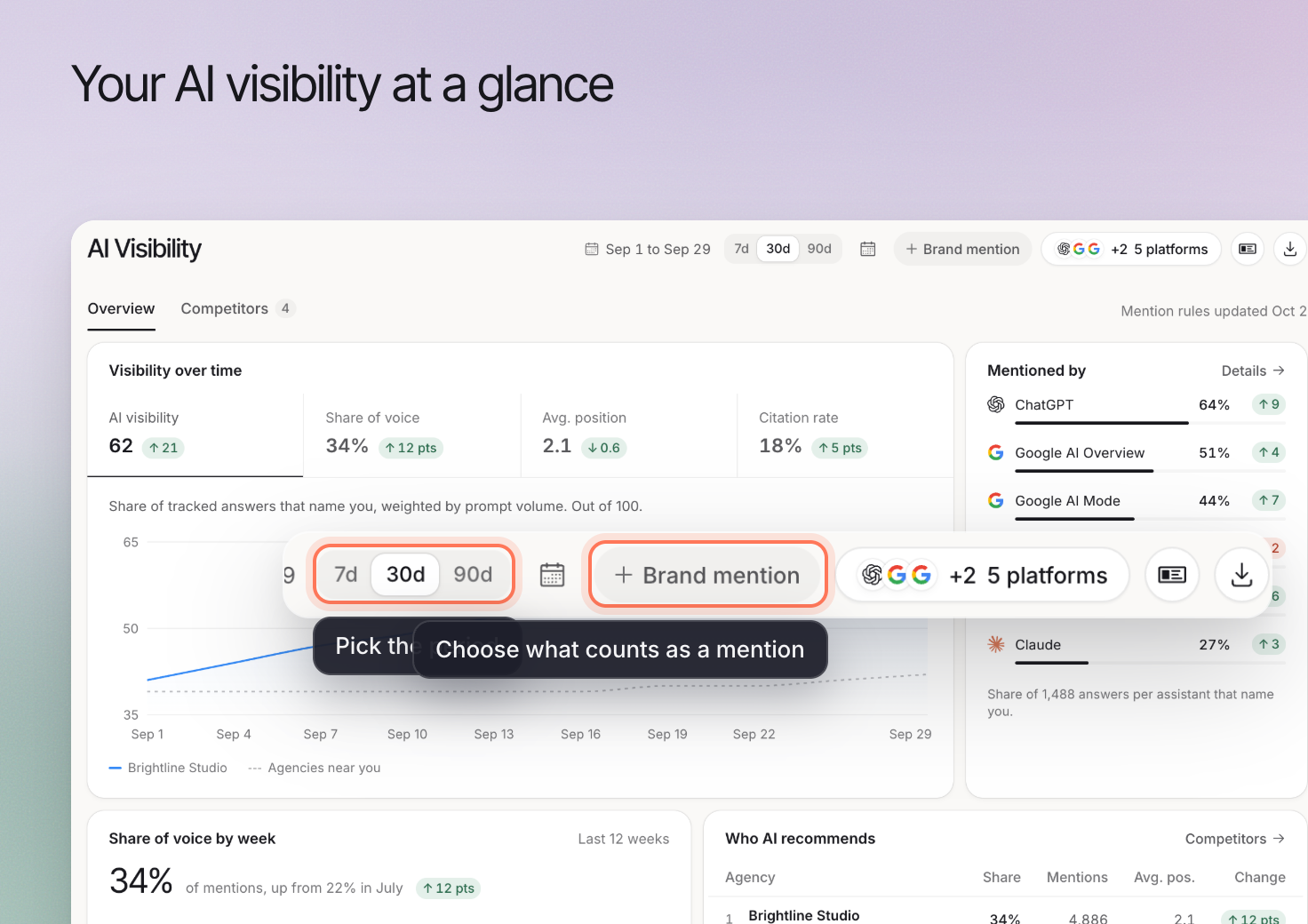 Use **AI Visibility > Overview** to see how your brand appears in collected AI answers and decide what to investigate next. The dashboard summarizes the prompts and platforms you track. It does not observe every buyer's conversation.
If you have no answers yet, [run your first prompts](https://www.erlin.ai/docs/get-started/run-your-first-prompts). Tasks follow once each prompt has run at least 4 times on different days and you have picked competitors.
## 1. Set the scope of the comparison
Choose the date range (**7d**, **30d** or **90d**, or a custom range of up to 365 days) and review **Brand mention**. **Branded prompts** contain your name; **Non-branded prompts** help you examine questions that do not name the business already.
Keep the prompt set, platforms and run locations comparable when reviewing a change. Adding a new group of difficult prompts can change the summary even when older answers stay similar.
## 2. Read the metrics together
| Metric | What it helps you examine |
|---|---|
| **AI visibility** | Presence of your brand in tracked answers |
| **Share of voice** | Your presence relative to other named brands |
| **Avg. position** | Placement when an answer ranks your brand |
| **Citation rate** | Citations to your own website |
**Mentioned by** shows your share of voice on each AI platform, highest first. A mention, a citation and a visit are different events. Read [How Erlin works](https://www.erlin.ai/docs/get-started/how-erlin-works) for the distinction between estimated prompt demand and collected answers.
## 3. Open the evidence behind a change
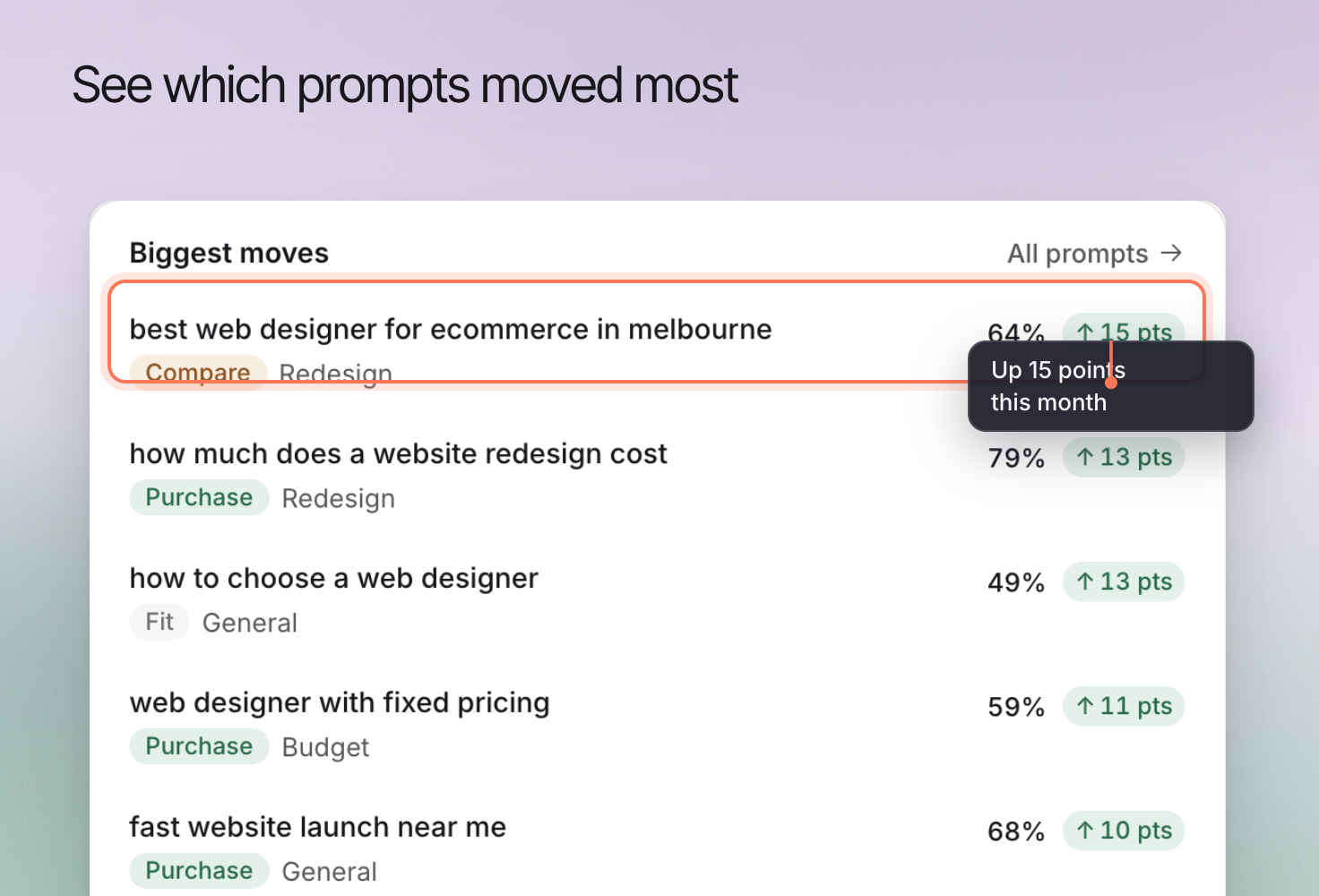
Use **Biggest moves** to find prompts worth reviewing. Read an individual answer before concluding that a score reflects better recommendations or more accurate information.
**Who AI recommends** lists the five brands with the largest share of voice, plus yours if it is not among them (or your picked competitors if no rivals are found), and leads into [competitor comparisons](https://www.erlin.ai/docs/ai-visibility/competitors). **Top cited sources** leads into [citation review](https://www.erlin.ai/docs/ai-visibility/citations/overview). If a name is counted incorrectly, adjust [Brand mention rules](https://www.erlin.ai/docs/ai-visibility/brand-mentions).
Use **AI Visibility > Overview** to see how your brand appears in collected AI answers and decide what to investigate next. The dashboard summarizes the prompts and platforms you track. It does not observe every buyer's conversation.
If you have no answers yet, [run your first prompts](https://www.erlin.ai/docs/get-started/run-your-first-prompts). Tasks follow once each prompt has run at least 4 times on different days and you have picked competitors.
## 1. Set the scope of the comparison
Choose the date range (**7d**, **30d** or **90d**, or a custom range of up to 365 days) and review **Brand mention**. **Branded prompts** contain your name; **Non-branded prompts** help you examine questions that do not name the business already.
Keep the prompt set, platforms and run locations comparable when reviewing a change. Adding a new group of difficult prompts can change the summary even when older answers stay similar.
## 2. Read the metrics together
| Metric | What it helps you examine |
|---|---|
| **AI visibility** | Presence of your brand in tracked answers |
| **Share of voice** | Your presence relative to other named brands |
| **Avg. position** | Placement when an answer ranks your brand |
| **Citation rate** | Citations to your own website |
**Mentioned by** shows your share of voice on each AI platform, highest first. A mention, a citation and a visit are different events. Read [How Erlin works](https://www.erlin.ai/docs/get-started/how-erlin-works) for the distinction between estimated prompt demand and collected answers.
## 3. Open the evidence behind a change
Use **Biggest moves** to find prompts worth reviewing. Read an individual answer before concluding that a score reflects better recommendations or more accurate information.
**Who AI recommends** lists the five brands with the largest share of voice, plus yours if it is not among them (or your picked competitors if no rivals are found), and leads into [competitor comparisons](https://www.erlin.ai/docs/ai-visibility/competitors). **Top cited sources** leads into [citation review](https://www.erlin.ai/docs/ai-visibility/citations/overview). If a name is counted incorrectly, adjust [Brand mention rules](https://www.erlin.ai/docs/ai-visibility/brand-mentions).
 ## 4. Choose the next useful action
Use the download icon (**Export**) to save a PDF of the Overview; it stays disabled until at least one answer names your brand.
Review [recommendations](https://www.erlin.ai/docs/opportunities/opportunity-and-action), then inspect the page or source that supports the proposed change. A missing service description may need a content update; an inaccurate third-party listing needs a different response.
Use **Traffic from AI** and **Top AI landing pages** when connected analytics data is available. A visibility increase does not itself establish a traffic or revenue increase. Review those outcomes separately in [lead analytics](https://www.erlin.ai/docs/leads/analytics).
## 4. Choose the next useful action
Use the download icon (**Export**) to save a PDF of the Overview; it stays disabled until at least one answer names your brand.
Review [recommendations](https://www.erlin.ai/docs/opportunities/opportunity-and-action), then inspect the page or source that supports the proposed change. A missing service description may need a content update; an inaccurate third-party listing needs a different response.
Use **Traffic from AI** and **Top AI landing pages** when connected analytics data is available. A visibility increase does not itself establish a traffic or revenue increase. Review those outcomes separately in [lead analytics](https://www.erlin.ai/docs/leads/analytics).